Daikin air conditioner symbols explained
The symbols on a Daikin wall-split remote break into three groups: five mode icons (AUTO, COOL, DRY, HEAT, FAN), a set of airflow and comfort icons (fan bars, SWING, COMFORT, INTELLIGENT EYE, POWERFUL, ECONO), and the timer and clock indicators. This page names each one using Daikin Australia's own manuals for the ARC466 remote, with a note on the ARC480 handset supplied with Lite models.
What the ARC466 display shows
Daikin's manuals describe the LCD as showing "the current settings": the selected mode, the set temperature, the airflow rate, the clock and day, and any ON, OFF or WEEKLY timer that is active. The same temperature area doubles as the fault-code readout, and the entire display blinks when the batteries are exhausted.
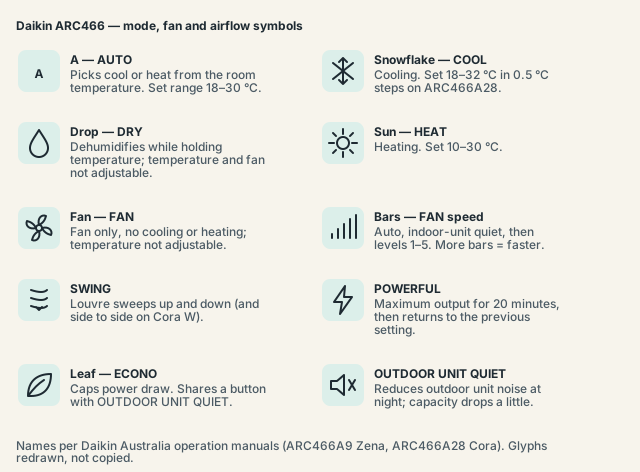
One honesty point first. The names on this page — AUTO, DRY, COOL, HEAT, FAN, POWERFUL, ECONO, COMFORT, INTELLIGENT EYE, NIGHT SET — are Daikin's own, from the Zena (ARC466A9) and Cora (ARC466A28) operation manuals. The manuals print the pictograms as graphics without describing them, so the shapes in the figures (snowflake for COOL, sun for HEAT) are drawn as they appear on the handset and as Australian installer guides describe them, not from Daikin text. Two installer guides even disagree on whether POWERFUL is a bolt or a flexed arm. If a pictogram looks different on your remote, trust the word printed under the button.
The remote sends by infrared, so it needs line of sight: "to use the remote controller, aim the transmitter at the indoor unit." Daikin quotes a transmission range of about 6 m for the Zena handset and about 7 m for the Cora one.
Mode symbols: AUTO, COOL, DRY, HEAT and FAN
The MODE button on an ARC466 cycles through five settings in a fixed order: AUTO, DRY, COOL, HEAT, FAN. The active mode is the single icon shown on the display, beside the set temperature. Daikin Australia's FAQ describes each mode in a sentence, and the temperature ranges below come from the ARC466A9 booklet.
| Symbol on display | Daikin name | What it does | Temperature range |
|---|---|---|---|
A |
AUTO | "Selects an appropriate operation mode (COOL or HEAT) based on the indoor temperature and starts the operation" | 18–30 °C |
| Snowflake | COOL | "Operation for cooling" | 18–32 °C |
| Water drop | DRY | "Eliminates humidity while maintaining the indoor temperature as much as possible" — temperature and airflow are controlled automatically, "so manual adjustment of these functions are not available" | Not adjustable |
| Sun | HEAT | "Operation for heating" | 10–30 °C |
| Fan blades | FAN | Circulates air with no cooling or heating | Not adjustable |
Temperature moves in 0.5 °C steps on the Cora ARC466A28 remote. If the TEMPERATURE buttons appear to do nothing, check the mode first: in DRY and FAN the setting is locked by design.
Airflow symbols: fan rate, SWING, COMFORT and INTELLIGENT EYE
The FAN button "selects the airflow rate setting", shown as a row of bars: more bars means a faster fan. The Cora manual presents the cycle as AUTO, five numbered levels and a quiet setting; the Zena booklet names the same steps as auto, indoor unit quiet, low, middle low, middle, middle high and high.
- SWING — "Adjusting the airflow direction." Press it and the louvre sweeps up and down; press it again to stop the sweep. The Cora W remote has both vertical and horizontal swing.
- COMFORT — "COMFORT AIRFLOW" sets an airflow that avoids direct exposure, steering air away from people in the room. On the Zena ARC466A9 this shares a button with the sensor function (COMFORT/SENSOR); the Cora ARC466A28 gives each its own button.
- SENSOR / INTELLIGENT EYE — a motion sensor on the indoor unit that eases output when nobody is in the room. Cora units have a green INTELLIGENT EYE lamp that lights while it is active.
POWERFUL, ECONO and OUTDOOR UNIT QUIET
These three are boost and restraint settings rather than modes, so their icons sit beside the mode symbol instead of replacing it. POWERFUL runs the unit at maximum capacity for 20 minutes and then returns to the previous setting; ECONO caps the power draw; OUTDOOR UNIT QUIET lowers the noise from the unit outside.
ECONO and OUTDOOR UNIT QUIET share one button on the ARC466 (labelled ECONO/QUIET); the manual's wording is simply "ECONO/OUTDOOR UNIT QUIET operation". Each gets its own icon on the display — a leaf for ECONO in the figure above, a crossed speaker for QUIET.
The running cost calculator gives a rough idea of what a lower power cap saves over a summer.
Timer and clock symbols
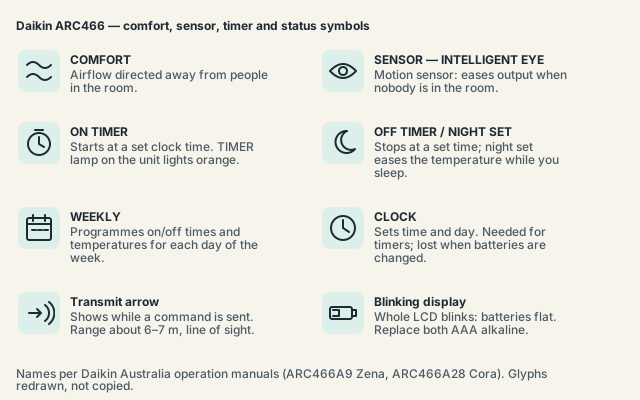
An ARC466 remote has a real clock, so its timers work on clock time rather than a countdown. The display carries the time and day of the week permanently, adds an ON or OFF timer time when one is set, and shows a weekly indicator while a WEEKLY programme is active. The TIMER lamp on the indoor unit lights orange whenever any timer is set.
Setting the clock, per the ARC466A9 booklet: press CLOCK (the clock and day indication blinks), SELECT to choose the day, CLOCK again so the time blinks, SELECT to set the time — "holding down accelerates adjustment" — and CLOCK to confirm.
The timers themselves:
- ON TIMER and OFF TIMER — press the button, set the time with SELECT, confirm. The Zena manual cancels with the same timer button ("timer display and setting time disappear"); the Cora manual uses TIMER CANCEL. Daikin also calls the OFF TIMER function NIGHT SET mode, its bedtime use.
- WEEKLY — WEEKLY, then PROGRAM, then SELECT, NEXT and BACK to build each day's reservations; COPY duplicates a day. Press WEEKLY again to switch the programme off.
- TIMER CANCEL clears the ON and OFF timers only. The ARC466A9 booklet states it is "unavailable for WEEKLY TIMER", which is why people find the weekly icon still lit after pressing it — deactivate the weekly programme through the WEEKLY button instead.
"Once you set ON/OFF TIMER, the time setting is kept in the memory. The memory is canceled when remote controller batteries are replaced" — so a battery change means re-setting the clock and every timer. The EU booklet adds that ON and OFF or WEEKLY timers must not share the same time, and that a timer that ignores you is usually running from a wrong clock.
How is the ARC480 remote on Daikin Lite different?
The ARC480 supplied with Lite FTXF and DTXF models drops the MODE cycle and the clock. Instead of one MODE button there are separate AUTO, COOL, DRY, HEAT and FAN buttons, and instead of clock-time timers the ON TIMER and OFF TIMER count hours, "1 ~ 12 hours" per the manual listing, with no weekly programme at all.
What carries over is familiar: TEMPERATURE up and down, a FAN button with rates 1–5 plus quiet, SWING, COMFORT ("starts COMFORT AIRFLOW operation"), POWERFUL, ECONO and TIMER CANCEL. The OFF TIMER again doubles as NIGHT SET mode, and range is about 7 m.
The Australian ARC480 booklet was not read for this page; the button set comes from a Daikin service manual and listings for the ARC480A49 and ARC480A14. The older L-Series ARC452 manual could not be retrieved, so nothing is claimed about it.
Symbols people ask about
Most "what does this symbol mean" searches are really "why is my remote doing this". The answers below are the ones Daikin's own manuals give for the ARC466 handset; where the manual is silent on a question, the page says so plainly rather than guessing at an answer.
- Remote not responding, or only from close up. "The batteries may be exhausted. Replace both batteries with new dry batteries AAA.LR03 (alkaline)." Inverter-type fluorescent lights and direct sun on the receiver can also block the signal, and the 50 cm below the receiver should be kept clear.
- Whole display blinking. On the Cora, "when battery power has run out, the LCD will begin blinking as an alert that the batteries need replacing", and in that state only OFF still works. Fit fresh batteries, then re-set the clock and timers.
- Sun and snowflake at the same time. No Daikin manual retrieved for this page describes this; the ARC466 shows one mode icon at a time. What does show two colours is the multi-monitor lamp on a Zena indoor unit: red and blue together mean AUTO, blue COOL, red HEAT, green DRY, white FAN and orange TIMER.
- Switching °C to °F. No AU or EU ARC466 manual contains a Celsius/Fahrenheit switch; Australian ARC466 remotes display °C only. Procedures found online refer to US-market variants.
- A code like
U4orA5in the temperature area. That is the fault readout from the CANCEL procedure in Key Facts. Codes and meanings are on the Daikin error codes page;U4has its own page. - Is there a reset button? The ARC466 manuals describe none. Changing the batteries is the only reset, and it wipes the clock and timer memory.
The equivalent Mitsubishi Electric guide is Mitsubishi Electric remote symbols.
Frequently asked questions
Which Daikin remote do I have?
Look for the model printed inside the battery cover or on the back: ARC466A followed by a number (A9, A28, A58, A16 and others) on Cora, Alira, Zena and XL units; ARC480A on Lite; ARC452A on the older L-Series. ARC466 variants share the same symbol set and fault-code procedure.
Why won't the temperature change on my Daikin remote?
Check the mode icon. In DRY the unit "automatically controls temperature and airflow rate, so manual adjustment of these functions are not available", and FAN mode has no temperature either. Switch to COOL or HEAT and the buttons work again. If they still fail in COOL, replace both batteries.
What is the leaf symbol on a Daikin remote?
It is ECONO, the power-limiting setting, which shares a button with OUTDOOR UNIT QUIET. Daikin's manual confirms the name and the shared button; the leaf shape is how the icon appears on the handset, not something the manual describes.
How do I turn the timer off completely?
Press TIMER CANCEL for an ON or OFF timer. For a WEEKLY programme press WEEKLY, because TIMER CANCEL is "unavailable for WEEKLY TIMER". The TIMER lamp on the indoor unit goes out once nothing is set.
Sources and manuals checked
Button names, mode definitions, temperature ranges, timer and clock procedures, battery behaviour and the fault-code readout are quoted from Daikin's Australian Zena and Cora operation manuals, the EU ARC466A9 booklet and Daikin Australia's controller FAQ. The pictogram shapes are not described in any Daikin text and follow the handset and two Australian installer guides. The Australian ARC480 booklet and the ARC452 manual were not retrieved.
- Daikin Australia — Zena FTXJ25/35/50PVMA Operation Manual, 3P369488-1 (remote controller ARC466A9) (official)
- Daikin Australia — Cora FTXV20–71WVMA Operation Manual, 3P651499-4 (remote controller ARC466A28) (official)
- Daikin Europe — FTXS35-50K Operation Manual, 3P320970-1 (remote controller ARC466A9) (official)
- Daikin Australia — FAQ: What do the modes on my controller mean? (official)
- Daikin Australia — Operation manuals index (official)
- Daikin — Web manual, remote controller (ARC466A63) (official)
- Daikin — FTX-N Series service manual, ARC480A8 remote (p. 102) and ARC466 fault diagnosis (p. 119) (secondary)
- manua.ls — Daikin Lite ARC480A49 operation manual listing (FTXF20–50TVMA, 3P372379-11R) (secondary)
- Penair (Sydney) — Daikin Air Conditioner Symbols Explained (secondary)
- Airflow Australia — Daikin Air Conditioner Symbols Explained (secondary)