Fujitsu E:EE error
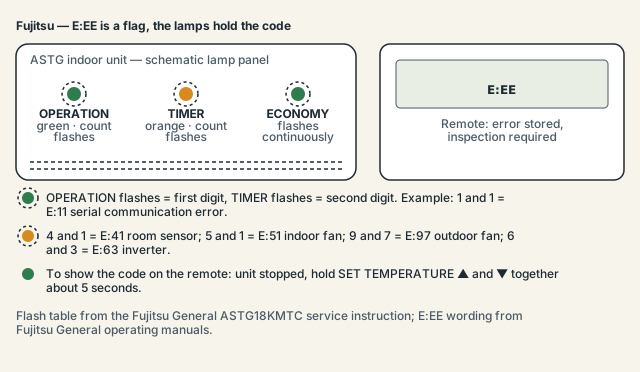
E:EE on a Fujitsu remote is not a fault code. It is the controller's way of saying a fault has been stored and "inspection of the air conditioning system is necessary". The actual two-digit code is retrieved by holding both SET TEMPERATURE buttons for five seconds, or by counting the OPERATION and TIMER lamp flashes on the indoor unit while ECONOMY flashes.
Safety first: in Australia, anything involving refrigerant needs an ARC-licensed technician, and anything behind an electrical cover needs a licensed electrician. Everything on this page is limited to checks you can do from outside the unit with the power off at the switchboard. Every code behind E:EE except a wiring or remote problem involves sensors, motors or the inverter, and those live behind covers.
What does E:EE mean on a Fujitsu air conditioner?
Fujitsu General's operating manuals put it in one sentence: "When the error indication 'E:EE' is displayed, inspection of the air conditioning system is necessary." The remote flashes E:EE in its clock display when the indoor unit has an error stored in memory. It is a flag, not a diagnosis, and the same flag appears for a sensor fault, a fan motor, a wiring problem or an inverter failure.
Some displays render it as EE:EE, and both mean the same thing. The information you need is the two-digit code behind the flag, which Fujitsu prints as E: followed by two digits — E:11, E:51, E:63 and so on. Once you have that number the troubleshooting is specific; until then the only accurate thing anyone can say is "something is stored".
Fujitsu's installation manual for the ASTG range adds a detail that trips people up: "An error display is displayed only during operation." If the unit is switched off at the remote the display may look normal; the flag and the flashes appear when you try to run it.
How do I find the real code behind E:EE?
Two methods, depending on your remote. On Fujitsu remotes with a clock display, stop the air conditioner and hold the SET TEMPERATURE ▲ and ▼ buttons together for five seconds or more; the remote enters self-diagnosis and shows the unit number and the stored code. Without that, count the lamp flashes on the indoor unit.
Method 1 — the remote self-diagnosis. Fujitsu General's operating manual 9373117063 and the UTY-RNNUM troubleshooting sheet describe the same sequence:
- Stop the air conditioner with the remote.
- Press the SET TEMPERATURE ▲ and ▼ buttons "simultaneously for 5 seconds or more".
- The display shows the faulty unit's address and the error code. Write it down.
- Press ▲ and ▼ together again for five seconds to exit, or wait about 20 seconds with no input.
One honest caveat. Both documents describing this sequence are Fujitsu General manuals for other remote-controller families. The Australian ASTG18/24KMTC operating manual lists "Error code display" against fast-blinking lamps and says only "Consult authorized service personnel" — it prints no key sequence and no E:EE text. The sequence was not confirmed for the wireless remote shipped with ASTG-KMTC units. If ▲+▼ does nothing on yours, use the lamps.
Method 2 — the lamp flashes. The ASTG12CMCB installation manual states that with a wireless remote "the lamp on the photo detector unit will output error codes by way of blinking patterns". On the KMTC series the green OPERATION lamp flashes the first digit, the orange TIMER lamp flashes the second, and ECONOMY flashes continuously in every error state. Count each lamp over at least two cycles: OPERATION 5 and TIMER 1 is E:51, the indoor fan motor.
Fujitsu flash-count and error-code table
This is the "Error display" table from the ASTG18KMTC service instruction, which also covers ASTG24KMTC. The wired-remote code is E: plus two digits; the lamp counts are what you see on the indoor unit. Every row is a technician item once identified, but knowing the row tells you how urgent the call is.
Table: Fujitsu ASTG-KMTC error codes by lamp flash count (ECONOMY flashes continuously in all cases)
| Code | OPERATION flashes | TIMER flashes | Meaning |
|---|---|---|---|
E:11 |
1 | 1 | Serial communication error (indoor–outdoor) |
E:12 |
1 | 2 | Wired remote controller communication error |
E:23 |
2 | 3 | Combination error |
E:32 |
3 | 2 | Indoor unit PCB model information error |
E:35 |
3 | 5 | Manual-auto switch error |
E:41 |
4 | 1 | Room temperature sensor error |
E:42 |
4 | 2 | Indoor heat-exchanger (middle) temperature sensor error |
E:51 |
5 | 1 | Indoor unit fan motor error |
E:62 |
6 | 2 | Outdoor unit main PCB model information error |
E:63 |
6 | 3 | Inverter error |
E:64 |
6 | 4 | PFC circuit error |
E:65 |
6 | 5 | Trip terminal L error |
E:71 |
7 | 1 | Discharge temperature sensor error |
E:73 |
7 | 3 | Outdoor heat-exchanger liquid temperature sensor error |
E:74 |
7 | 4 | Outdoor temperature sensor error |
E:84 |
8 | 4 | Current sensor error |
E:86 |
8 | 6 | High pressure switch error |
E:94 |
9 | 4 | Trip detection |
E:95 |
9 | 5 | Compressor rotor position detection error |
E:97 |
9 | 7 | Outdoor unit fan motor error |
E:99 |
9 | 9 | 4-way valve error |
E:A1 |
10 | 1 | Discharge temperature error |
Grouped by what they point to:
- Communication and configuration —
E:11,E:12,E:23,E:32,E:35,E:62. TheE:11serial error is the Fujitsu equivalent of Daikin'sU4and Panasonic'sH11: wiring, a terminal, or a board on one side. Power problems are the usual trigger. - Sensors —
E:41,E:42,E:71,E:73,E:74,E:84. Thermistors and the current sensor. Cheap parts, all behind a cover. - Fan motors —
E:51indoor,E:97outdoor. Check from outside for anything jamming the outdoor fan; do not put anything through the grille. - Inverter and power —
E:63,E:64,E:65,E:94,E:95. The outdoor electronics and compressor drive; the costly end of the table. - Refrigerant circuit and protection —
E:86,E:99,E:A1. Pressure, the reversing valve and discharge temperature. Refrigerant work is ARC-licensed in Australia.
The ASTG30KMTC service manual indexes further codes, including E:18 for the WLAN adapter and E:A3 and E:A5 for thermal and pressure conditions. Those were not read row by row and are not tabulated here.
What to check before you call a Fujitsu technician
There is less to do here than on some brands, and it is better to say so than pad the list. Fujitsu General's documents give the owner one diagnostic step — reading the stored code — and no official reset procedure. The checks below are about arriving at the phone call with the right information.
- Read the code first. Use the ▲+▼ five-second hold, or count the OPERATION and TIMER flashes over two full cycles. Do this before you switch anything off; the installation manual says the error is only displayed during operation.
- Write down the code and the model number from the sticker on the indoor unit (for example ASTG24KMTC).
- Switch the unit off at the breaker. Fujitsu's safety note for a fault reads: "immediately stop operation of the air conditioner, and disconnect all the power supply by turning off the electrical breaker or disconnecting the power plug." This is also the only reset available to you: power off, wait a few minutes, power on, restart once. Fujitsu does not state a wait time.
- Restart once and watch. If
E:EEand the flashes return, stop there. Repeated resets do not help. - Rule out the normal lamp states. The KMTC operating manual lists automatic defrosting, the filter-clean indicator, demand-response operation and a timer-setting error ("Reset the clock and timer settings") as lamp patterns that are not faults. If ECONOMY is not flashing continuously, you may be looking at one of those.
- Look, do not open. From outside, check the outdoor fan is not jammed by debris and the interconnect conduit has not been crushed or chewed. Anything under a cover is licensed work.
- Note what happened before — a blackout, storm, new solar installation or roof work.
Is there a Fujitsu E:EE reset?
No official one. Every Fujitsu General document checked for this page ends the same way: E:EE or fast-flashing lamps means "consult authorized service personnel". There is no key combination in the operating manuals that clears the stored fault, and the only user-level action is a breaker-off power cycle, which you should do once, not repeatedly.
The flag exists because the indoor unit has decided a stored condition needs a human with a multimeter, and the codes behind it are all sensors, motors, boards or refrigerant. A reset that hides the flag without fixing the cause delays the same visit. If the code was E:11 after a storm and stays clear for a week after one power cycle, treat it as a supply glitch. Anything else, or anything that returns, is a booking.
Fujitsu General Australia keeps an "Error codes" support article with an attached PDF it calls "the authoritative source for each model-specific code, LED pattern and reference value". That attachment could not be retrieved for this page; if your model is not a KMTC, ask your installer for it.
Related Fujitsu codes and lamp states
The code most often found behind E:EE on a stopped unit is E:11, the indoor–outdoor serial communication error, because a power event can trigger it. E:51 and E:97 are the fan motors, E:63 is the inverter, and E:41 and E:42 are the two indoor temperature sensors. The remaining rows are rarer.
If the lamps are flashing but ECONOMY is steady or off, re-read the KMTC operating manual's table: defrost, filter reminder, demand response and the timer-setting error all use the lamps and none is a fault. Other brands express the same "go and get the code" idea differently — Mitsubishi Electric uses a counted blink on the Operation Indicator and Panasonic blinks the TIMER lamp. If the code turns out to be an inverter or compressor item on an older unit, the running cost calculator helps weigh the repair against a newer system.
Frequently asked questions
Is E:EE the same as EE:EE on a Fujitsu?
Yes. Different remote displays render the same flag as E:EE or EE:EE, and both mean an error is stored and the system needs inspection. Neither is a fault code in itself. Use the SET TEMPERATURE ▲+▼ five-second hold, or count the lamp flashes, to get the two-digit code that actually describes the fault.
Can I keep using the air conditioner with E:EE showing?
Fujitsu General's instruction for a fault is to stop operation and switch off at the breaker or plug, then consult authorised service personnel. Some codes let the unit run for a while, but the manuals do not list which, and running with a stored motor or inverter fault risks a bigger repair. Read the code, switch off, and book.
The ▲ and ▼ buttons do nothing on my remote — why?
The five-second SET TEMPERATURE sequence is documented in Fujitsu General manuals for remotes with a clock display, but the Australian ASTG-KMTC operating manual does not print it, and it was not confirmed for that remote. Count the OPERATION and TIMER lamp flashes on the indoor unit instead; the table above converts the counts to the code.
What does E:11 mean, since it comes up so often?
E:11 is the serial communication error between the indoor and outdoor units, shown as one OPERATION flash and one TIMER flash. The causes are wiring, terminal connections or a circuit board on either side, and a power event is the usual trigger. One breaker reset is reasonable; if it returns, the interconnect wiring needs a licensed technician.
Does a dirty filter cause E:EE?
Not directly — none of the 22 codes in the KMTC table is a filter code, and the filter-clean reminder is a separate, normal lamp state in the operating manual. Clean the filter anyway; a blocked one loads the fan motor, and it is the one maintenance item that is yours to do.
Sources and manuals checked
The meaning of E:EE and the ▲+▼ self-diagnosis come from two Fujitsu General documents (operating manual 9373117063 and the UTY-RNNUM troubleshooting sheet); the 22-row flash table is quoted from the ASTG18KMTC service instruction. The Australian ASTG-KMTC operating manual does not print the key sequence, Fujitsu General Australia's authoritative error-code PDF could not be retrieved, and no Fujitsu document gives a call-out cost, so none is quoted.
- Fujitsu General — Operating Manual 9373117063 (ARU-RML), 'E:EE' and self-diagnosis by SET TEMPERATURE buttons (official)
- Fujitsu General — Troubleshooting 2-1 Error Display, UTY-RNNUM remote self-diagnosis for E:EE (mirrored by Master) (official)
- Fujitsu General — Service Instruction ASTG18/24KMTC, error display lamp table p. 26 (official)
- Fujitsu General — ASTG18/24KMTC Lifestyle Series Operating Manual (indicator lamp table, pp. 14–15) (official)
- Fujitsu General — ASTG12CMCB Installation Manual, section 17 Error codes (official)
- Fujitsu General (Aust.) — Error codes support article (official)