Mitsubishi Electric air conditioner light blinking
A blinking light on a Mitsubishi Electric wall split is either a normal signal that the room is close to the set temperature, or a stored fault. The difference is whether the unit is still running. If it has stopped and the Operation Indicator repeats a counted blink pattern with a pause, Mitsubishi Electric's manual says to stop using it and consult your dealer.
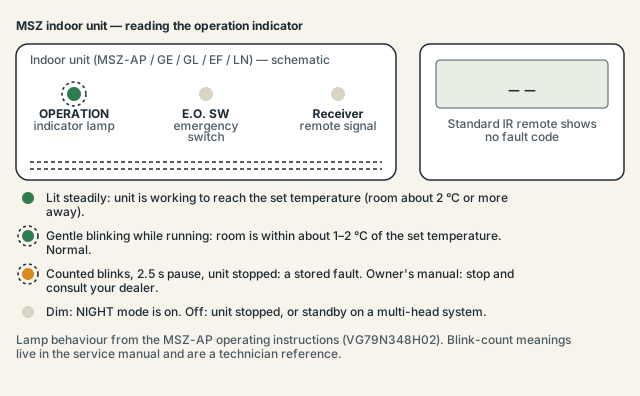
Safety first: in Australia, anything involving refrigerant needs an ARC-licensed technician, and anything behind an electrical cover needs a licensed electrician. Everything on this page is limited to checks you can do from outside the unit with the power off at the switchboard. Reading the blink count is done from across the room; decoding it and the checks that follow are service-manual work on live boards.
Is a blinking light on a Mitsubishi Electric air conditioner always a fault?
No. The Australian user manual for the MSZ-AP series lists "blinking" as a normal display state: it means "the room temperature is approaching the set temperature", roughly 1–2 °C away from the target. A lit lamp means the unit is still working to reach the set point, and an unlit lamp is standby on a multi-head system. Only a blink pattern on a stopped unit is a fault.
The normal blink is easy to recognise once you know what to look for. The unit keeps running, air keeps coming out, and the lamp flickers without any obvious count. Set the temperature a few degrees further from the room temperature and the lamp will go back to steady — that confirms it was the approach signal, not a stored error.
The fault blink is different. The indoor unit stops, or never starts, and the lamp flashes a fixed number of times, goes dark for about 2.5 seconds, then repeats. The user manual's troubleshooting page covers that case in one line, under the heading "In the following cases, stop using the air conditioner and consult your dealer": "When the operation indicator lamp blinks." It does not tell you what the number of blinks means.
Why doesn't the manual explain the blink count?
Mitsubishi Electric keeps the blink decode in the service manual, not the owner's booklet. The owner's document only describes the normal lamp states, the "stop and consult your dealer" instruction, and a handful of things you can try yourself. Every remedy attached to a counted blink involves a thermistor, a fan motor, a circuit board or the outdoor unit, so the company treats the whole table as technician territory.
That is also why MSZ wall units with the standard infrared remote never show a code on screen. There is no CHECK button on the remote and no error display on the indoor unit. The two-character codes you may have seen quoted for Mitsubishi Electric — P1, E6, U4, UF and so on, with their four-digit equivalents — belong to wired PAR-series controllers, Mr Slim ducted and cassette units, and City Multi systems. If your remote is a handheld infrared type, the blink count is the only fault language the unit has.
The same manual's "stop using" list also covers water dripping from the indoor unit, a breaker that trips frequently, abnormal noise and any sign of a refrigerant leak. Any of those, with or without the lamp, means switch off at the breaker and ring your installer.
What can I safely check before ringing anyone?
The user manual allows four things, all from outside the unit. Check whether NIGHT mode is dimming the lamp, turn the breaker off and on, clean the air filter, and use the emergency operation switch if the remote itself seems to be the problem. Everything else in the troubleshooting chapter is a question to ask your dealer rather than a repair.
- Confirm the unit has actually stopped. Hold a hand near the outlet. If air is moving and the lamp only flickers, it is the "approaching set temperature" signal. Change the set point by 3 °C and watch whether the lamp goes steady.
- Count the blinks. Stand where you can see the indoor unit, count the flashes between the dark gaps, and check the count over at least two cycles. Write it down with the model number from the side of the indoor unit (for example MSZ-AP50VGKD2). Both go to the technician.
- Check NIGHT mode if the lamp is dim rather than blinking. The manual's troubleshooting page pairs "the operation indicator lamp is dim" with "Is the NIGHT mode set?". A dim lamp is not a fault.
- Turn the breaker off and on. The manual gives this step for horizontal-vane problems; it also restarts both circuit boards. Switch the air conditioner off with the remote, switch off the breaker at the switchboard, wait a few minutes, switch it back on and restart. The manual does not state a wait time.
- Clean the air filter. Mitsubishi Electric's schedule is every 2 weeks for the air filter, every 3 months for the air-cleaning filter, and a new air-cleaning filter every year. A choked filter will not produce a counted blink on its own, but it is the first thing a technician looks at.
- Try the emergency operation switch. If the remote is not being received — the manual notes that inverter-type fluorescent lamps can block the signal — press the E.O. SW on the indoor unit. If the unit runs in emergency cool or heat, the remote or its signal path is the problem.
- Note what preceded it. A storm, a blackout, roof work or a new solar system all help the technician.
If the blink pattern returns after the breaker reset, do not keep cycling the power. Book the technician with the count and the model number ready.
How emergency operation works on the indoor unit
The E.O. SW is a small switch on the indoor unit that runs the system without the remote. Each press steps through Emergency COOL, then Emergency HEAT, then Stop. The settings are fixed — 24 °C, medium fan, automatic vane — and the first 30 minutes are a test run with no temperature control and the fan on High.
Emergency operation is not a fault reset. It exists so that a lost or broken remote does not leave you without cooling, and so an installer can run a test. The service manual uses the same switch as part of the technician's memory-clearing procedure, but a successful emergency run is a useful fact for the technician — "it runs from the switch but not from the remote" — rather than a fix.
Blink-count table (technician reference)
The table below is from the OBH799 and OBH788 indoor-unit service manuals for the MSZ-AP series and is reproduced so you know what the count you wrote down probably means. Every remedy on the right requires opening the unit, and in Australia that is a licensed electrician or ARC-licensed technician. The count itself is the only part you use.
Table: Indoor unit Operation Indicator blink counts (MSZ-AP series service manuals)
| Blink pattern | Fault area | What the service manual describes | Technician remedy |
|---|---|---|---|
| 0.5 s on / 0.5 s off continuously | Indoor–outdoor wiring or serial signal | Neither unit operates; the serial signal from the outdoor unit is not received for 6 minutes | Check wiring and serial signal |
| 2 blinks, 2.5 s off | Indoor coil or room-temperature thermistor | Short or open circuit detected | Check thermistor characteristics |
| 3 blinks, 2.5 s off | Indoor fan motor | No rotation feedback for 12 seconds after the fan is started | Check indoor fan motor |
| 4 blinks, 2.5 s off | Indoor control system | Indoor board cannot read its non-volatile memory | Replace indoor PCB |
| 5 blinks, 2.5 s off | Outdoor power system | Compressor overcurrent protection triggered 3 times in 1 minute | Check inverter and compressor |
| 6 blinks, 2.5 s off | Outdoor thermistors | Short or open circuit during operation | Check outdoor thermistors |
| 7 blinks, 2.5 s off | Outdoor control system | Memory read failure on the inverter or outdoor control board | Replace inverter or outdoor control PCB |
| 14 or more blinks, 2.5 s off | Other outdoor abnormality | Unspecified; includes stop-valve and four-way-valve checks | Outdoor failure-mode recall |
| Lamp stays lit | Outdoor control system | Outdoor board cannot read its non-volatile memory | Read the LED on the outdoor board |
Two notes. The two-blink pattern is the one most often asked about, and it points to an indoor thermistor — a sensor, not a compressor. And the MSZ-GE, GL, EF and LN ranges use the same blink scheme in their own service manuals, but those tables were not independently checked for this page.
The outdoor unit (MUZ-AP) has its own, longer blink table in service manual OBH789-A, read from an LED on the outdoor control board or replayed through the indoor lamp with a remote-control key combination the service manuals call the failure-mode recall function. The user manual never mentions it, so it is not repeated here.
Wired controllers and Mr Slim units show codes instead
If your Mitsubishi Electric system has a wall-mounted wired controller, or is a ducted, cassette or Mr Slim unit, you will not be counting blinks. Those systems display a letter-number code such as P4, E6 or U1, often with a four-digit equivalent, and the reading procedure is different: press CHECK twice within 3 seconds and step through with the TEMP buttons.
A few of those codes overlap with the blink table. E6, E7 and E9 are indoor–outdoor communication errors, the continuous 0.5-second blink on an MSZ. P1 is the intake sensor and P2 and P9 are pipe sensors, the two-blink thermistor fault. U4 is an outdoor thermistor, the six-blink case. Mitsubishi Electric UK runs an official lookup form for these codes; Mitsubishi Electric Australia's site had no equivalent page when checked. Other brands use a similar communication code — Daikin's is U4 and Panasonic's is H11.
For what the icons on the handheld remote itself mean, see the Mitsubishi Electric remote symbols page.
Frequently asked questions
My Mitsubishi Electric light blinks but the unit still works — should I worry?
No. A blinking Operation Indicator on a running unit is the manual's "approaching the set temperature" state, shown when the room is within about 1–2 °C of the target. It will alternate with a steady lamp as the room drifts. A fault blink comes with a stopped unit and a fixed, repeating count.
What does two blinks mean on a Mitsubishi Electric air conditioner?
In the MSZ-AP service manuals, two blinks followed by a 2.5-second pause is a short or open circuit on the indoor coil thermistor or the room-temperature thermistor. It is a sensor, not the compressor, and replacing it involves opening the indoor unit, which is licensed work. Count over two cycles before you rely on the number.
Can I reset a blinking light by turning the power off?
You can try. The user manual lists turning the breaker off and on as a user step, and it restarts both circuit boards. If the count comes back the fault is stored for a reason, and the manual's instruction is to stop using the unit and consult your dealer rather than keep resetting.
Why is there no error code on my remote?
MSZ wall splits with the infrared remote have no code display; the blink count is the only fault indication. Letter-number codes like E6 or P4 appear on wired PAR-series controllers and on Mr Slim, ducted and cassette units. If you are searching a code for a wall split, the blink table above is the right reference.
Does the E.O. SW clear the fault?
Not in the user manual's description. The emergency switch runs the unit at fixed settings when the remote cannot be used; the service manual uses it as part of clearing stored fault memory, but that is a technician procedure. If the unit runs from the switch and not from the remote, tell the technician — it narrows the problem.
Sources and manuals checked
Normal lamp meanings, the "stop using and consult your dealer" instruction, filter intervals and the emergency-operation description are quoted from the Mitsubishi Electric Australia MSZ-AP user manual and its European twin. The blink-count table is from the OBH799 and OBH788 indoor-unit service manuals for MSZ-AP and was not separately confirmed for the GE, GL, EF and LN ranges; no Mitsubishi Electric document gives a call-out or repair cost, so none is quoted.
- Mitsubishi Electric Australia — Split-Type Air Conditioners Operating Instructions for User, MSZ-AP25–50VGD2/VGKD2, VG79N348H02 (official)
- Mitsubishi Electric — Operating Instructions for User, MSZ-AP25–50VG (European edition, mirrored) (official)
- Mitsubishi Electric — Indoor Unit Service Manual OBH799, MSZ-AP15/20VF (troubleshooting check table) (official)
- Mitsubishi Electric — Indoor Unit Service Manual OBH788, MSZ-AP25–71VG/VGK (mirrored) (official)
- Mitsubishi Electric — Outdoor Unit Service Manual OBH789-A, MUZ-AP25–71VG (section 12 troubleshooting) (official)
- Mitsubishi Electric UK — Error Code Lookup (Mr Slim, M Series, City Multi) (official)